Connect. Detect. Go.
Find running emulator instances automatically. Select your instance without hunting for installation paths.
AUTOMATIC INSTANCE DETECTION
 CLASHPILOTPurchase
 Less repetition. More control. Bring your Home Village sessions together with ClashPilot Pro for Windows.
BUILT AROUND YOUR VILLAGE
From connecting your emulator to reviewing a session, keep the essentials within reach.
Find running emulator instances automatically. Select your instance without hunting for installation paths.
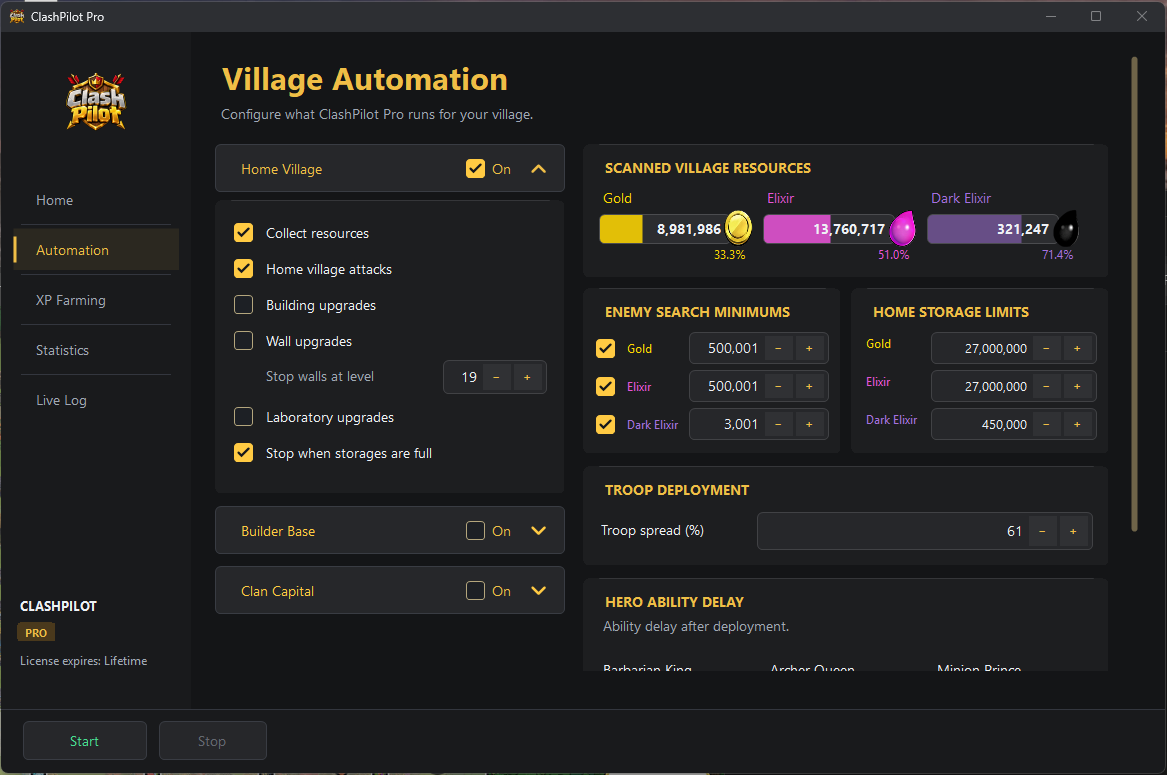
Configure Home Village jobs, minimum enemy loot, wall targets, and storage limits. Keeps your settings saved.
Read Gold, Elixir, and Dark Elixir from your village screen, with connection monitoring and a session log.
In active development. Core connection, scanning, and saved settings are implemented. Automated attack and upgrade actions are still being validated in live gameplay.
READY WHEN YOU ARE
Your first session starts with a few simple steps.
Get the Windows appOpen MuMu Player, LDPlayer, or BlueStacks and start the Android instance you want to use.
Open ClashPilot, choose your emulator, and click Detect. Select your running instance.
Enter your activation key, configure your Home Village settings, and start your session.
BEFORE YOU START
A Windows PC, a supported Android emulator with Clash of Clans installed, and a ClashPilot activation key. Supported emulators are MuMu Player, LDPlayer, and BlueStacks.
Activation keys are issued through the ClashPilot Discord bot. A key binds to the first PC that activates it. Timed keys start their duration on first activation.
ClashPilot Pro currently focuses on the Home Village. The app includes connection controls, resource scanning, saved automation settings, statistics, and session monitoring.
The project is in active development. Emulator detection, game launch, resource scanning, licensing, and saved settings are implemented. Attack, collector, donation, building, laboratory, and wall actions still require live-game validation.
MEET YOUR NEW COPILOT
Get ClashPilot Pro and make yourself at home.
CLASHPILOT PRO
Activate ClashPilot on your Windows PC and put your village settings to work.
Activation keys will be available here once checkout opens.